
Skip to content
Siteleads Docs

Contact Widget Configuration

  • Understanding Contact Widgets
  • Creating a Contact Widget
  • Phone channel configuration
  • WhatsApp channel configuration
  • Email channel configuration
  • Messenger Channel Configuration
  • Instagram DM Channel Configuration
  • Instagram Page Channel Configuration
  • WeChat Channel Configuration
  • Snapchat Channel Configuration
  • Discord Channel Configuration
  • TelegramĀ Channel Configuration
  • SMS Channel Configuration
  • TikTokĀ Channel Configuration
  • X (Twitter) Channel Configuration
  • Google Maps Channel Configuration

Creating Channels & Widgets (AI Agent Setup)

  • Configuring an AI Agent
  • Understanding Channels
  • Creating a Channel Widget
  • Creating AI Agent Account
  • Targeting & Display Triggers
  • Visual Customization

AI Assitant Configuration

  • Creating AI Assistant
  • General Settings
  • Training Sources
  • Conversation Settings
  • Predefined Questions

Visual Customization

  • Mobile View OptionsĀ 
  • Greeting settings
  • Attention effects
  • Desktop View Settings

Targetting and Display Rules

  • Widget Display Triggers
  • Page Targeting
  • Date Scheduling
  • Day Scheduling
  • Traffic Sources Targeting
  • Geographic Targeting

Leads, Messages and Analytics

  • The Leads Section
  • The Messages Section
  • The Analytics Section

Upgrade and license activation

  • The “My Account” section
  • How to activate the SiteLeads license
  • Free vs Pro Features

Miscellaneuous

  • System requirements
  • How to Install and Activate the Plugin
View Categories
  • Home
  • AI Assitant Configuration
  • Predefined Questions

Predefined Questions

< 1 min read

The Predefined Questions tab allows you to create curated question-and-answer pairs.

These act as controlled responses for frequently asked queries.


Adding a Predefined Question #
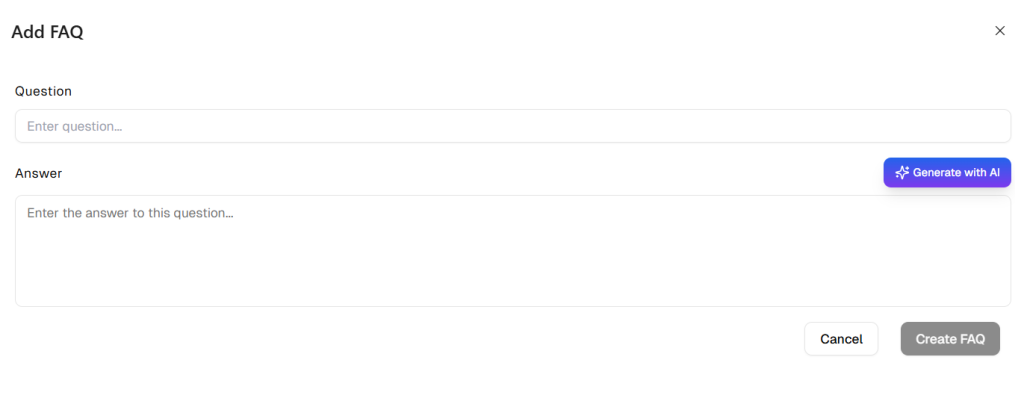
  1. Click Add Question.
  2. Enter the question.
  3. Provide the curated answer.
  4. Save.

Use this feature for:

  • FAQs
  • Policies
  • Pricing
  • Compliance-sensitive information

Editing or Deleting Entries #

Each entry includes:

  • Edit option
  • Delete option
  • Bulk selection tools
  • Search functionality

Limiting Replies to Predefined Answers #

Enable Limit replies to predefined answers to restrict the AI to only use predefined responses.

When enabled:

  • Dynamic responses from website content are disabled.
  • Only curated answers are used.

Recommended for:

  • Regulated industries
  • Strict compliance environments
  • Fully controlled messaging requirements

When disabled:
The assistant combines:

  • Website training data
  • Uploaded documents
  • Predefined answers

for flexible, intelligent responses.


Saving and Publishing #

After completing configuration:

  • Click Save to store changes.
  • Click Save & Publish to apply settings live.

Once published, your AI Assistant will operate based on:

  • Configured identity and tone
  • Defined training sources
  • Automated lead capture rules
  • Starter and follow-up engagement logic
  • Curated predefined responses
Updated on March 16, 2026
Conversation SettingsCreating AI Assistant
Table of Contents
  • Adding a Predefined Question
  • Editing or Deleting Entries
  • Limiting Replies to Predefined Answers
  • Saving and Publishing

All rights reserved